Someone is following your tutorial exactly as written when step three fails. The missing piece is usually a permission, a package version, a running service, or a file the page never mentioned.
That is how a “15-minute build” turns into an hour of debugging the writer’s setup. The process below shows how to build and test a path a reader can actually finish.
Decide whether this should be a tutorial
A tutorial works because the reader builds something all the way through. After completing it, they should have enough context to try a nearby variation without step-by-step help.
Use another format when the reader only needs an answer.
Tutorial, how-to, reference, or explanation?
The Diátaxis framework separates documentation into four modes:
| Content type | The reader needs to… | A useful example |
|---|---|---|
| Tutorial | Learn through a guided experience | Build and deploy a first worker |
| How-to guide | Complete a specific task | Rotate an API key |
| Reference | Look up exact facts | Check request parameters |
| Explanation | Understand a concept or decision | Learn how rate limiting works |
The distinction keeps a tutorial from turning into a product encyclopedia. Readers can follow one path while reference and background material live behind links.
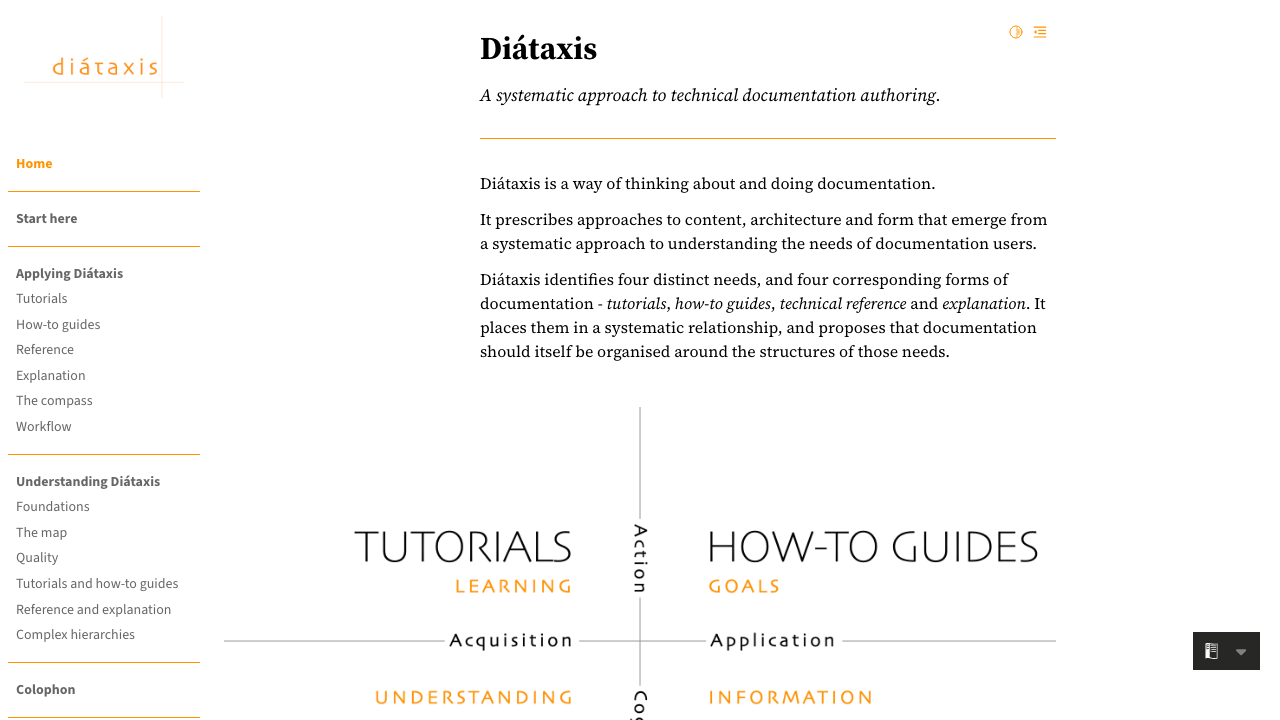
Tutorials sit on the learning side of the map and guide action. Reference and explanation answer different reader needs.
If the reader only needs an answer, write a how-to or reference page. Use a tutorial when the journey itself teaches something.
Define the reader and the finish line
The thing is, “developers” says almost nothing about the audience. A Python developer deploying a first serverless function has different gaps from a platform engineer evaluating the same runtime.
Google's technical writing guidance on audience frames the problem well: documentation must cover what readers need to know after accounting for what they already know. Turn that into two short notes before outlining.
Write the starting state
State what the reader already knows, has installed, and can access. Be specific enough that someone can decide whether the tutorial is for them.
For example:
This tutorial is for JavaScript developers who can use a terminal and have Node.js 22 installed. You need an account that can create a project and an API token with write access; prior queue experience is optional.
The starting state protects beginners from hidden assumptions. Experienced developers can also leave before spending ten minutes on material they already know.
Show the completed result early
Name the thing the reader will build and the proof that it works. A screenshot, sample response, or ten-second demo gives the steps a purpose.
“Learn webhooks” is vague. “Create a webhook endpoint, verify its signature, and inspect one successful event” is a finish line.
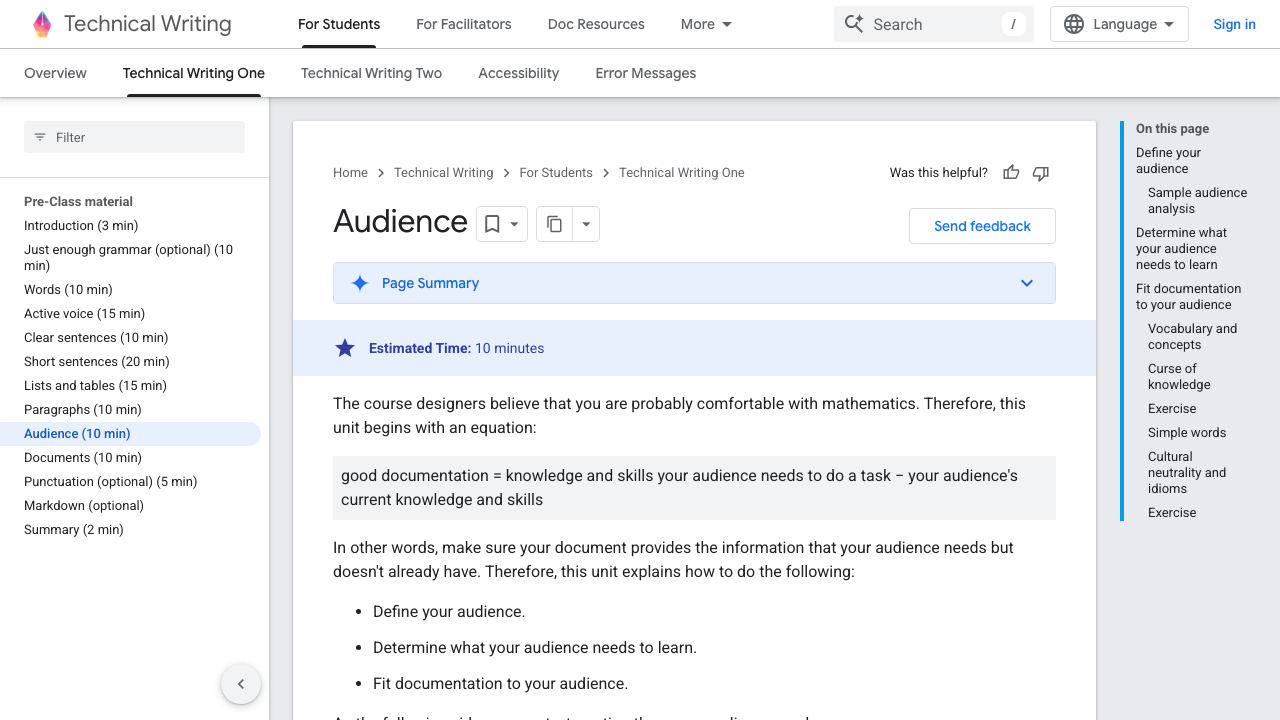
The useful question is not how much the writer knows. It is the gap between the reader's current knowledge and the knowledge needed to complete this tutorial.
Build the working path before the outline
Open a clean project and do the work exactly as the reader will. As you go, record the commands, decisions, responses, and failures while they’re still fresh.
The recorded path is better raw material than memory. Memory quietly removes permission prompts, package versions, waiting time, and the “obvious” command that made the next step possible.
List prerequisites as checks
A prerequisite should be testable. Replace “make sure Docker is installed” with the version command and the minimum version you used.
node --version
# v22.0.0 or later

docker --version
# Docker version 27 or later
Separate software, accounts, permissions, and background knowledge. If a reader needs billing enabled or an administrator to approve access, say that before step one.
Use task-based headings
Headings should tell a skimmer what they can accomplish. “Configuration” names a topic, while “Configure the client with your API key” names a task.
A clean tutorial outline might look like this:
- Create the project.
- Install and configure the client.
- Send the first request.
- Handle one failure.
- Verify the completed result.
- Clean up the resources.
Those headings also work as a progress indicator. A reader returning after a break can find the next action without reconstructing the whole page.
Put context next to the decision
Explain a concept when the reader needs it to choose or understand an action. Three screens of architecture before the first command arrives too early.
Keep the explanation short, then link to a deeper page. The tutorial connects to the rest of the documentation without swallowing it.
Write code readers can run
Code is part of the path you promised. Treat it with the same care as any other sample developers are expected to run.
Prefer complete examples at the point of use
Show the imports, file name, environment variables, and surrounding function when they affect whether the sample runs. Ellipses are acceptable only when the missing section truly has no effect on the step.
For a change inside a larger file, show a focused snippet and then link to the complete example repository. Tell the reader exactly where the snippet belongs.
Explain the result, not every line
After a code block, tell the reader what changed and what output to expect. Avoid narrating syntax that the audience already understands.
Use annotations for the details that affect behavior:
const response = await client.events.create({
  type: "order.created",
  idempotencyKey: order.id,
});
Explain that the idempotency key makes a retry safe. “This code calls events.create” only repeats what the code already says.
Include one meaningful failure
The happy path teaches sequence, but one well-chosen failure teaches the system. Show the error a reader is likely to hit, explain its cause, and give a diagnostic check before the fix.
Keep the main path out of troubleshooting-manual territory. Cover the failure that best explains product behavior, then link to the fuller page.
Cut side quests from the main path
It’s tempting to add optional branches because they make the tutorial feel complete. The tradeoff is that every branch makes the main path harder to see.
A step is essential if removing it prevents the promised result or hides a necessary decision. Everything else becomes a note, a link, or a follow-up tutorial.
Keep choices out of the critical path
Pick one supported framework, deployment target, and authentication method for the main path. Explain the choice, then cover alternatives after the result.
Alternatives belong after the working result. At that point, the reader has enough context to compare them.
Make progress visible
Add a checkpoint after each risky stage. A command output, UI state, or sample response tells the reader whether to continue or repair the current step.
The critical path stays visible. Optional frameworks, deeper theory, and alternative deployments branch out after the reader reaches the result.
Test the tutorial from a clean environment
Your machine is full of invisible help: cached credentials, global packages, old environment variables, and services you forgot were running. That’s how broken instructions end up looking correct.
Run the tutorial in a fresh container, virtual machine, or new cloud project. Copy commands from the rendered page so the test covers formatting too.
Test what the reader sees
Check these details during the run:
- Every link resolves to the intended page.
- Commands work in the shell you name.
- Versions match the tools used in the example.
- Code blocks preserve quotes, indentation, and line breaks.
- Expected output still resembles the current product.
- Screenshots show the current interface and include useful alt text.
- Cleanup steps remove billable or sensitive resources.
Record how long the verified path takes, but do not promise a completion time based only on the author's machine. Account creation and approval steps can dominate the experience.
Ask a reader to narrate their confusion
A technically correct tutorial can still be hard to follow. Watch someone in the intended audience attempt it and ask them to say what they expect before each step.
Give the pause a moment before helping. It often reveals a missing transition, an unclear heading, or a choice the page failed to make.
Edit for the skimmer
Most readers will scan before they commit. The page must communicate its route even when someone reads only the title, introduction, headings, callouts, and code.
For the final pass, blur the prose and look only at the page structure. If it does not reveal the journey, the headings are too generic or the checkpoints are missing.
A final editorial checklist
Before publishing, ask:
- Does the introduction name the reader and the result?
- Does every H2 mark a meaningful stage in the journey?
- Do H3 headings break complex stages into concrete tasks?
- Is each paragraph doing one job in no more than two sentences?
- Does every screenshot prove a state or clarify a decision?
- Does every code block run in the documented environment?
- Can the reader tell when each stage has succeeded?
- Is the next useful action clear at the end?
Google's self-editing guidance recommends reading prose aloud and editing from the audience's perspective. Both expose awkward sentences and missing assumptions.
Worked example: design a webhook tutorial
Suppose the product needs a tutorial for receiving signed webhooks in an Express application. Set the outcome as a completed workflow: build an endpoint, verify the signature, trigger an event, and inspect the result.
A stronger promise is:
Build an Express endpoint, verify the request signature, trigger a test event, and confirm that an invalid signature is rejected.
The outcome covers one workflow and ends with evidence. It includes signature verification as part of the path.
Define the starting project
Give the reader a small, known starting project with these constraints:
Node.js: 22 or later
Package manager: npm 10 or later
Framework: Express 5
Files supplied: package.json, src/server.js, .env.example
Account access: permission to create a webhook endpoint and test event
The tutorial can link to equivalents for Fastify, Next.js, and Python after the Express path works. Putting all four frameworks in the main sequence would multiply every instruction and failure mode.
Outline checkpoints, not topics
A weak outline might contain Introduction, Setup, Configuration, Testing, and Conclusion. A reader cannot predict the state they will reach at any point.
Use an outline that exposes progress:
- Create the Express endpoint.
- Preserve the raw request body.
- Verify the webhook signature.
- Register the local endpoint.
- Trigger and inspect a test event.
- Reject an invalid signature.
- Remove the temporary endpoint.
Each heading ends in observable behavior. The security decision about raw request bodies appears immediately before the code that depends on it.
Show the complete critical code
The verification step should include the file, imports, and error path:
import express from "express";
import { verifyWebhook } from "@example/webhooks";

const app = express();

app.post(
  "/webhooks/orders",
  express.raw({ type: "application/json" }),
  (request, response) => {
    try {
      const event = verifyWebhook({
        body: request.body,
        signature: request.header("x-example-signature"),
        secret: process.env.WEBHOOK_SECRET,
      });

      console.log(event.type, event.id);
      response.sendStatus(204);
    } catch (error) {
      response.status(401).json({ error: "invalid_signature" });
    }
  },
);
The explanation should focus on the non-obvious part: signature verification needs the exact raw bytes that were signed. A global JSON parser can change those bytes before the verification function sees them.
Put a checkpoint after every risky transition
After starting the server, show a health request. After registering the endpoint, show its expected status in the product or CLI.
After triggering the event, provide the terminal output:
order.created evt_01J2M6W4T7YQ8F6P3N9C
Then send a request with a deliberately invalid signature and show the expected response:
HTTP/1.1 401 Unauthorized
Content-Type: application/json

{"error":"invalid_signature"}
The failure test proves that verification is active. A tutorial that only receives a 204 may be accepting every request.
Explain the production boundary
The tutorial uses a local tunnel and logs the event. End with a short production boundary that covers idempotency, retries, secret rotation, and queueing.
Production guidance should cover idempotency, duplicate delivery, secret rotation, response timeouts, queueing, logging, and replay. Link each topic to a focused page and suggest the next tutorial, such as processing events asynchronously.
Retest the rendered path
Copy the commands and code from the built article into a clean directory. When smart quotes, missing imports, a stale package version, or an incorrect working directory breaks the path, repair the article at that step.
The finished test should leave behind the same files and output promised at the top. That closes the contract the tutorial made with the reader.
Before committing to a tutorial, compare it with finished technical-writing examples that serve other reader jobs. The types of technical documentation guide helps decide whether the task belongs in a tutorial at all.
Technical tutorial FAQ
How long should a technical tutorial be?
Long enough to deliver one useful result without skipping required work. If the path contains several independent outcomes, split it into a series and give each part its own verified finish line.
Should a tutorial explain every line of code?
No. Explain decisions, unfamiliar behavior, and details that affect the result while allowing the code to carry obvious syntax.
How many screenshots should a technical tutorial include?
Use a screenshot when the reader must recognize a visual state or find a control that is difficult to describe. Capturing every click makes the page brittle and harder to maintain.
What is the difference between a quickstart and a tutorial?
A quickstart proves that the product works with the shortest supported path. A tutorial uses a fuller project to teach a workflow and the judgment needed to adapt it.
How often should tutorials be retested?
Retest them when dependencies, product interfaces, authentication, or setup steps change. High-traffic and first-run tutorials deserve scheduled checks because one broken step can block every reader.